
-

Staying safe online for children & teenager
Children and teenagers grow up in a digital world where being online is part of everyday life. Used responsibly, digital tools offer many benefits: they support learning, help young people stay connected, explore interests, and build digital skills. At the same time, online environments also expose children and teens to a range of evolving risks.
The most effective protection does not require technical expertise. It comes from awareness, clear rules, and everyday habits that encourage children to pause, check and ask for support before they click, share, or send money.

Where to start? Practical security basics for families
At first, the topic of online safety can seem quite overwhelming. Not just for children, but for parents too. But a small number of basic protection measures, combined with an understanding of why they matter, can make a lasting difference—even when you’re not around. The following points provide a good foundation for navigating the digital world more safely.
Family rules & confidence
Show content of Set boundaries and build trust
- Agree on clear and age-appropriate family rules: what can be shared, which apps are allowed, and when screens are used. Make it normal to ask for a second opinion – especially when something feels urgent or emotive.
- Explain the reasoning behind these rules. Criminals often rely on pressure and urgency to stop people from thinking clearly or asking for help. Children should know that they will never be in trouble for checking first.
Show content of Explore together before going solo
- When your child starts using a new app, game or online service, go through it together first. This helps them understand how legitimate services look and where typical risks appear.
- Why this matters: many scams rely on rushing users into acting without thinking. Shared first experiences build confidence and judgement.
Show content of Stay informed
- Online threats change quickly, including new scam formats, fake content, and AI-generated messages. Staying informed helps parents recognize emerging risks early.
- The Deutsche Bank Security Hub provides up-to-date information and deeper guidance on relevant topics.
Secure devices and accounts
Show content of Use parental controls transparently
- Use device and app settings to manage downloads, screen time, age ratings, and in-app purchases. Review these settings together and explain their purpose.
- Why this matters: Changing security settings can help reduce exposure to risk. They are there to support safety – not to monitor or restrict unnecessarily.
Show content of Use public WiFi with care
- Public WiFi should only be used when necessary and never for sharing sensitive information.
- Why this matters: public networks can be insecure. Traffic may be intercepted, or users may be redirected to malicious websites that look legitimate.
Show content of Download apps safely
- Agree that apps should only be downloaded from official app stores, not from links in messages, pop-ups, or websites offering “free hacks” or add-ons.
- Why this matters: fake downloads are a common way to spread malware or steal login details, especially through games and “free” offers.
Show content of Keep devices up to date
- Ensure that all devices – smartphones, tablets, laptops, and gaming consoles – install operating system and app updates automatically.
- Why this matters: updates often close security gaps that criminals actively exploit.
Show content of Protect device access
- Set up screen locks (PIN, fingerprint, or face recognition) and automatic locking on all devices.
- Why this matters: a locked device helps protect chats, photos, saved passwords, and payment apps, if a device is lost or borrowed.
Show content of Secure accounts together
- Help your child create strong, unique passwords for each account. Enable multi-factor authentication (MFA) wherever possible.
- Why this matters: reused passwords allow attackers to access multiple accounts at once. MFA can stop account takeovers even if a password is compromised.
Show content of Prepare account recovery in advance
- Check that key accounts have recovery options (email address, phone number, backup codes) that your family can access.
- Why this matters: recovery settings often determine whether an account can be restored quickly – or lost permanently.
If something happens: an action plan for parents

- Pause and reassure
Do not click further links, reply, or send money. Reassure your child that they are not at fault and that you will handle the situation together. - Secure accounts and devices
Change passwords for affected accounts, starting with email and payment-related services. Enable MFA where available and log out of unknown sessions or devices. - Preserve evidence
Take screenshots of messages, usernames, links and transaction details. Note dates, times, and platforms. - Report and get support
Report and block the incident within the app or platform. If money or banking is involved, contact your bank through official channels. For bullying or grooming, seek local support services and involve schools or authorities where appropriate.
Recognising common online threats
Children and teens do not need to memorise technical terms. It is enough to recognize recurring patterns. A simple family rule can help: If something feels urgent, secret, or too good to be true – pause and check with a trusted adult.
-

Phishing – fake messages designed to trigger a click
Phishing messages imitate trusted brands, platforms, or even friends to trick users into clicking links, scanning QR codes, logging in, or sharing information.
What parents can do
- Agree that logins and payments should never be made via links in messages.
- Encourage children to use official apps or manually typed website addresses.
- Make it easy to ask for a quick check at any time.
Learn more: Phishing (Knowledge Base)
Also helpful: Quishing (QR code phishing)
-

Social engineering - manipulation rather than hacking
Criminals exploit emotions such as fear, authority, or urgency to push people into risky actions.
What parents can do
- Teach the warning signs: pressure, secrecy, urgency, emotional stories, and requests for codes or money.
- Encourage verification through a second channel or a trusted adult.
Learn more: Social Engineering (Knowledge Base)
Also helpful: Quishing (QR code phishing) and Vishing (Voice Phishing)
-

AI, deepfakes and fake content
Artificial Intelligence (AI) can generate realistic text, images, voices, and videos, making scams and misinformation harder to detect.
What parents can do
- Reinforce that professional-looking or dramatic content is not automatically trustworthy.
- Verify any requests involving money, passwords, or personal information.
- Confirm urgent messages from friends or family by calling them using a trusted number or asking in person.
Learn more: Artificial Intelligence (Knowledge Base) and Deepfakes (Knowledge Base)
Common digital spaces and typical risks
Children and teens spend most of their online time in a small number of digital environments. Understanding the typical risks in each helps families set clear expectations – without constant supervision.
Gaming
Streaming
Online shopping
Banking & payments
Cyberbullying and online grooming
Not all risks are technical. Some involve harmful behavior from other people.
Cyberbullying
Includes harassment, humiliation, threats, or sharing private content. Parent focus: listen first, reassure, save evidence, and block or report. For practical steps and support, see resources such as Better Internet for Kids.
Online grooming
Involves building trust to manipulate a child into unsafe situations. Parent focus: prioritise safety over blame, preserve evidence, report the behavior, and seek professional support if needed.
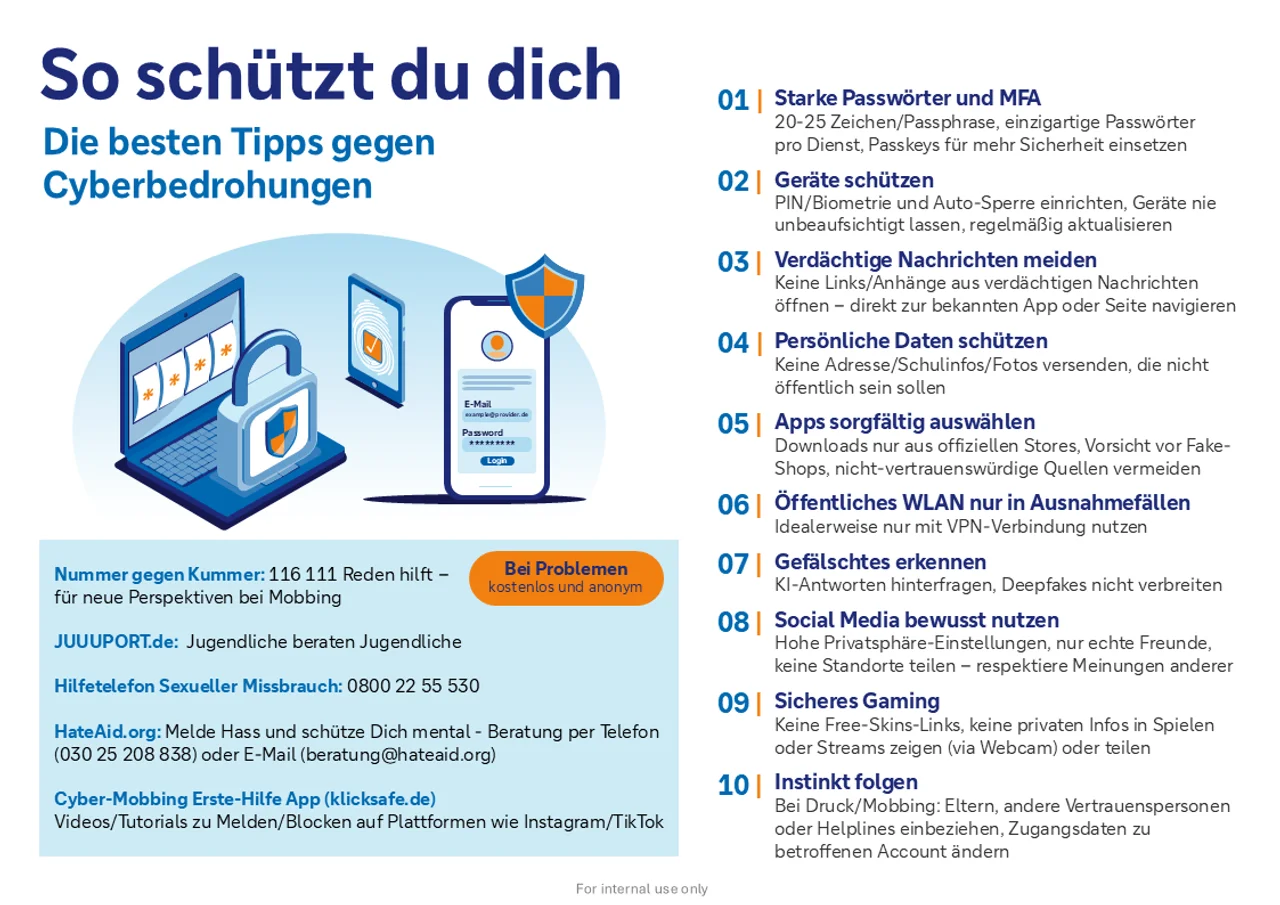
Top 10 Online Safety Tips for Kids & Teens Your family’s quick safety guide
Download our “Online Safety for Kids and Teens” flyer: a compact summary of the most important points, including the Top 10 tips for digital security. Ideal to print and pin up at home.