-

Information security: protecting your data in everyday digital life
Companies face a variety of challenges, including cyberattacks such as CEO fraud, targeted phishing campaigns and ransomware attacks. A successful attack can cause not only financial damage, but also permanently impact the trust of customers and partners. Therefore, it is crucial that all employees – from senior leadership to the most junior individual – understand and actively contribute to safeguarding information security.

Key points:

Phishing and social engineering are key entry points – the best protection against them is alert employees and clear reporting channels.
Technical fundamentals, such as multi-factor authentication (MFA), updated systems, secure networks and protected email communication can prevent many attacks at an early stage.

Clear, well-established processes for payments, data access and remote working provide essential information security for everyday business life.
Information Security
Information security forms the foundation for protecting corporate data, systems, and reputation.
This episode of the CyberSecure podcast explains core principles, common risks organizations face, and practical habits employees can adopt to keep sensitive information more secure.
What is information security?
Information security includes all the technical, organizational and personnel measures that protect data. It is based on three key principles:
- Confidentiality: only authorized people have access to sensitive information.
- Integrity: data remains complete and unchanged.
- Availability: important information and systems are accessible when needed.
These principles form the basis for protecting your data from cyberattacks, including phishing or malware.
Phishing: A threat to passwords and sensitive information
Email remains one of the most widely used means of communication – while also a popular attack route for cybercriminals. Fake messages (Phishing emails) aim to steal sensitive information such as passwords or credit card details.
Phishing emails can be grouped into two main types:
- Phishing to collect information
The aim is to capture credentials or other sensitive company information – for example, access data for email accounts, online banking or internal applications.
If attackers get valid credentials, they can pose as authorized users, use internal systems, initiate payments or extract further data. Central accounts (such as administrators, financial departments, or executives) are particularly vulnerable. - Phishing to inject malware
The purpose of this type of phishing is to get the recipient to open an attachment or click on a download link (e.g. "invoice", "application", "shipping confirmation").
Malware introduced can encrypt systems (ransomware), exfiltrate data, or spread unnoticed within the corporate network. This can lead to operational disruption, reputational damage, and regulatory or legal consequences.
Things to look out for:
- Check your emails - is the sender address correct? Are you being pressured to act immediately? Are the attachments suspicious? Establish clear processes for reporting suspicious emails (e.g. a central security mailbox or reporting button).
- Encryption: Whether for online banking, email communication, or storing sensitive data, encryption protects information from unauthorised access.
- Regularly train your staff to identify phishing and other scams, and practice their response with simulated phishing campaigns
- Ensure email filtering, virus protection and security updates are centrally managed and up to date
- Define trusted channels: Clarify which communication channels are allowed for sharing confidential information - and make it clear that sensitive data should never be requested by email.
- Establish password management: Set requirements for strong, unique passwords and rely on secure, shared password managers across the organisation.
- Regulate mobile security: Define requirements for official company smartphones and tablets - for example, apps only from official stores and mandatory updates.
- Set rules for remote work: Define how to handle public Wi-Fi, downloads, and sharing sensitive data - and reinforce these rules through training.
For detailed information on typical phishing characteristics, examples, and detection strategies, please refer to our separate Phishing Knowledge Base.

Multi-factor authentication (MFA) adds a second factor to passwords and protects company accounts, even when access data is revealed through phishing.
Make MFA mandatory for all security-critical accounts (e.g. email, remote accounts, cloud, online banking) and ensure company-wide central policies are in place.
For more details about MFA, see the article, "Multi-Factor Authentication (MFA)."
Protect email traffic
Email is the most important communication channel in most companies – and at the same time a central gateway for attacks. As well as learning to recognise phishing messages, you should also protect email traffic using the following methods:
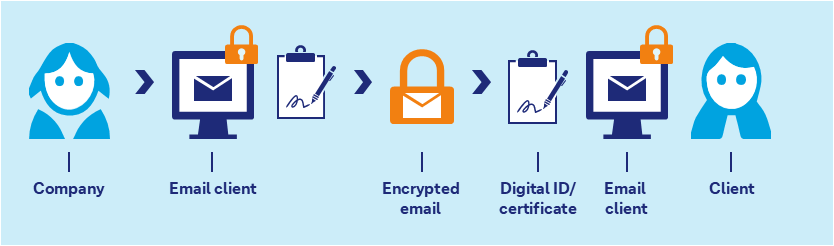
- Use digital signatures: signed emails show recipients that the message was actually sent from a company mailbox and was not altered along the way. For particularly sensitive areas (e.g. finance, HR or management communications), a digital signature should be standard.
- Encrypt confidential content: personal data, financial information or confidential contracts should only be sent via encrypted email. This prevents unauthorised access if communication is intercepted.
- Centralize control of technology: digital certificate-based solutions should be deployed and centrally managed by IT – including clear guidelines on when emails are automatically signed and/or encrypted.
Even with these technical safeguards, people remain a key factor. Even a “legitimate looking” email can come from a compromised account, which is where social engineering comes into play.
Social engineering – when people are targeted rather than technology
Phishing emails are often combined with social engineering techniques: attackers use publicly available information to appear credible, forge names or roles, and pressure or exploit employees into taking certain actions.
Things organisations should pay attention to
- Train and sensitise employees to attacks: Encourage people to question suspicious requests — even if they appear to come from a superior, business partner, or well-known contact.
- Encourage employees to say "no" and ask questions if something seems unusual or contradictory.
- Make contact channels transparent: Clearly define the channels used for different purposes (e.g. email, phone, video meetings) and communicate this across the organisation.
- Limit sensitive business information exposure: Review what internal information is publicly or easily accessible—such as organization charts, extension lists, space plans, project information, and customer information. Such information can be valuable to social engineers.
- Establish clear approval processes for payments, master data changes, or the sharing of sensitive information (e.g. four-eye principle, call-back at known numbers).
- The "Human Firewall" – your employees - are the first line of defense in any company. Therefore, train employees regularly and maintain their awareness of current threats and protective measures.
Examples of social engineering attacks, typical pretexts and warning signals can be found in our social engineering knowledge base.
Sustainable information security
Information security is not a one-off task, but an ongoing process. Particularly in times of increasing cyber attacks, it is crucial to exercise caution when dealing with sensitive data and to raise awareness within the organization of the importance of information security. With conscious behaviour - such as using strong passwords, recognising suspicious emails and handling data and devices carefully - everyone contributes to protecting personal and business information.
5 Tips to Make Your Business Information More Secure
- Strengthen employee knowledge
Regularly raise awareness of phishing, social engineering and safe behavior among your teams – and establish clear reporting channels for suspicious emails and calls. - Secure accounts consistently
Set guidelines to use strong, unique passwords in combination with multi-factor authentication for all business-critical access and support password management with robust password managers. - Protect email communications
Establish policies on when to sign and encrypt emails and centrally deploy appropriate solutions - especially for sensitive content. - Use secure technology and networks
Keep operating systems, virus protection, and browsers up to date. Protect home and corporate Wi-Fi with strong passwords and allow external access only via a secure connection (e.g. VPN). - Define clear processes for critical tasks
Set rules on who may approve payments, change master data, or share sensitive information (e.g. four-eyes principle, call-back via known numbers) and communicate these rules clearly across the organisation.
Frequently asked questions about information security
Show content of Why is information security important?
Information security protects sensitive data from misuse, unauthorized access and manipulation – and is essential for financial transactions.
Show content of How do I recognise a phishing email?
Look out for unexpected requests (especially for passwords, MFA codes, payments, or “account verification”), pressure/urgency, and requests for secrecy. Check the sender address and domain carefully, hover over links to see the real URL behind them, and be cautious with attachments (especially ZIP/Office files). If anything feels off, don’t click - report it via your organisation’s reporting channel and verify the request through a known, official contact method.
Show content of Why are strong passwords important?
Complex passwords make it significantly harder for cybercriminals to gain access and can help provide effective protection for accounts.
Show content of What is the value of Multi-Factor Authentication (MFA)?
MFA adds an extra security check (e.g. SMS or app code) on top of the password, making account access more secure.
Show content of How can I better protect mobile devices?
Only use apps from official stores, install updates regularly and avoid using public WiFi for sensitive online activities such as banking.